
Getting Guardrails Deployed
Any Security Goal is Now in Reach
Database deletion. Data exfil and lockout. S3 ransomware. Bedrock mutations. Any security goal you have can now be translated into a guardrails bundle and automatically deployed.
Service Control Policies and Resource Control Policies are powerful tools at your disposal. Maintaining and orchestrating them without breaking a production workload (at the right org, OU, or account scope) is hard. Now you can automate them without fear of breaking anything and with a developer-friendly workflow to grant exceptions.
Writing a policy it is step one of five. Four things happen after, and each one is where these projects actually stall.
1
You write the policy
One afternoon
2
Will it break anything?
Nobody can answer
3
Someone gets blocked
At 11 p.m.
4
Twelve policies later
Out of room
5
A new account appears
Default allow again
Four Things That Stall Out a Guardrails Project
Know What It Breaks Before You Deploy It
The policy is correct. The question nobody in the room can answer is whether anything in production is relying on the thing you’re about to block.
You can’t answer it from a diagram or from memory. Somewhere in your organization there is a pipeline built by someone who left, doing exactly this, every Tuesday at 3 a.m. If you deploy and find out the hard way, you don’t get a second attempt – the rollback becomes the story, and nobody signs off on the next guardrail deployment.
What Sonrai does: we continuously monitor what every identity in your AWS organization actually does, so before anything deploys you see the complete list of who is exercising the permissions in your control. Anything currently using them is exempted automatically, and you review and edit that list first. Connecting is effectively monitor mode — nothing enforces until you decide it does. You can also start in a single account or OU and watch it work before going wider.
This is the difference between deploying a guardrail and gambling with one.
“The challenge with deleting unused identities or enforcing least privilege is that we know it’s the ‘right’ thing to do, but everyone’s afraid it’ll break something or interrupt our development cycles. We don’t have to worry anymore.”
Handle the Exception Without a Ticket
Sooner or later the control blocks someone who genuinely needs through. A migration needs the permission. An incident needs it. A deploy needs it at 11 p.m.
Handled by hand, this goes one of three ways, and all three are bad. The control gets rolled back. Or someone spends two hours working out which of the IAM, resource, and organization policies caused the denial, then edits it and forgets to change it back. Or a permanent administrator exception gets carved into the policy so nobody has to do that again — which quietly hands one role everything the guardrail was meant to prevent.
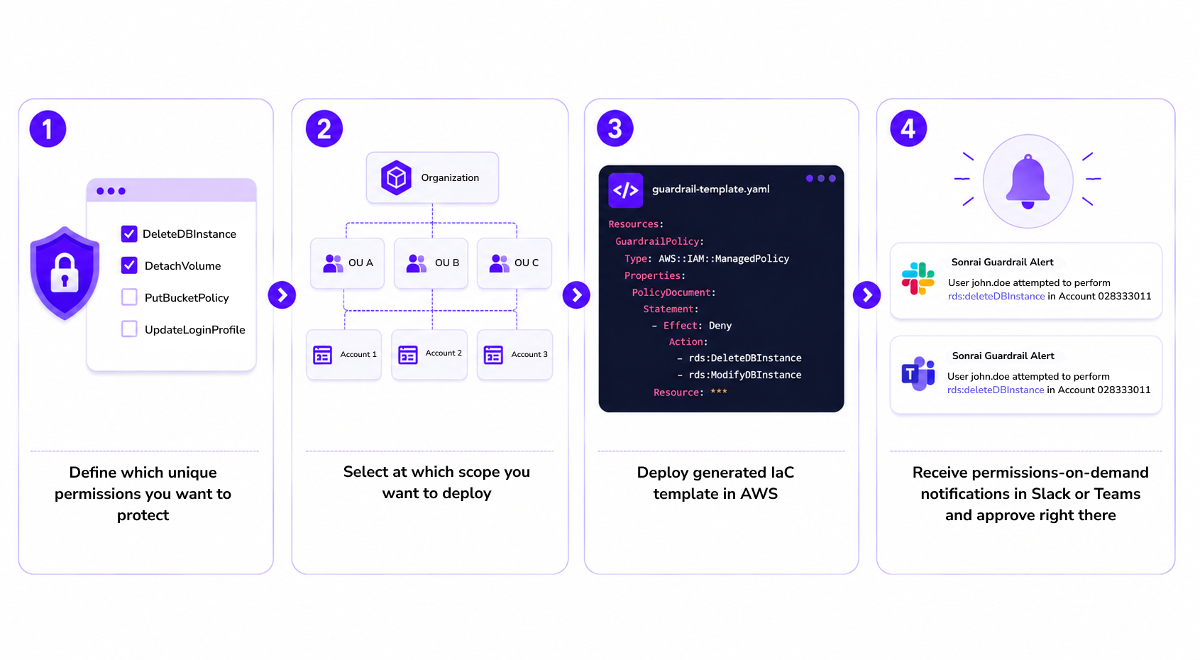
What Sonrai does: the denial itself opens a request, routed automatically to the owner we discovered from your cloud, in Slack or Teams. One-click approval. We identify the blocking policy and update it, so nobody troubleshoots. Access can be time-limited and revoke itself at expiry, an administrator can kill any active session instantly, and every request and grant is logged.
The person who needed access gets it in seconds and never learns what an SCP is. Nothing permanent gets carved out to make that possible.
Keep It Organized as You Add More
The first control is easy. The twelfth is a different problem entirely.
AWS caps the size of Service Control Policies and limits how many can attach at each level. Policies land at different points in your OU structure and interact in ways that aren’t obvious from reading any one of them. Six months in, you have a dozen policies, three of them overlapping, one of them nobody can explain, and the next request means someone has to work out whether there’s room.
What Sonrai does: policies are generated and compressed to stay inside AWS's size limits, scoped correctly per service, and organized for you. A control-capacity meter shows your remaining headroom, including against SCPs your organization deployed before you ever met us. Adding your twelfth control looks the same as adding your first.
This is the part teams don’t anticipate, and it’s the reason DIY guardrails stop growing after a handful.
Scoped the right way for future growth
Your cloud on the day you deploy is not the cloud you’ll have next quarter. New accounts get created. New roles, new service accounts, new permission sets appear constantly, and every one of them arrives at default allow.
A guardrail that has to be reapplied by hand each time is a maintenance task that eventually loses to more urgent work.
What Sonrai does: controls are deployed at the organization, OU, or account level, so new accounts and identities inherit them at the moment they're created. New permission sets enroll in just-in-time access automatically. Continued monitoring surfaces permissions that have newly gone unused, so coverage tightens over time instead of drifting.
You set the control once. It holds.
“Within five minutes I had disabled regions that were unused across my entire AWS organization.”
The Workflow
How You Set One Up
Define the permission set. Group the permissions the way you think about them rather than the way AWS organizes services. One control can span S3, KMS, and Backup if that’s what “nobody destroys our data” means in your environment. It can also match a single team’s access envelope, or a business unit with obligations the rest of the company doesn’t have.
Then choose what happens to it.
Protect
Restrict the set to only the identities that genuinely need it.
Disable
Remove it entirely at the scope you choose, for things nobody should be able to do.
Permissions on Demand
Leave it available on request, granted just-in-time through Slack or Teams with automatic expiry.
That’s the whole workflow. The four things above are handled for you as part of it, not assembled separately.
In Practice
What Teams Control This Way
A few of the requirements we see most often, to make it concrete:
Protect the role behind a critical production service from modification
Prevent deletion of buckets, keys, or backup vaults
Stop IAM access key creation
Restrict root user activity
Keep logging and security services from being switched off
Draw a hard boundary between two application teams sharing an account
Hold a business unit to rules the rest of the company doesn't need
If your requirement is a sentence about who should be able to do what, it’s a guardrail.
Where It Goes
One Control, or All of Them
Most teams start with the one requirement that brought them here. It’s worth knowing that the same machinery goes further whenever you want it to.
Sonrai continuously analyzes all 47,000+ cloud permissions and identifies the ~2,500 that are genuinely dangerous — the ones that expose data, enable entry, or escalate privilege. The same simulate, deploy, grant-on-demand workflow applies to those too, which is how organizations get to a durable default-deny state without running it as a project.
92% reduction in permission attack surface, because more than 90% of identities never use the sensitive permissions they hold. Global Atlantic cut the time to fix identity and permissions problems from 6 months to 6 days.
None of that has to be on your roadmap today. It’s just what tends to happen once the third control lands and nothing breaks.