

Ask a security team which identities can read their most sensitive data and most will have an answer. Ask which identities can delete it, and the room goes quiet.
That isn’t negligence. It’s how permissions get built. Access is granted around what a role needs to do, and the ability to destroy tends to arrive as a byproduct: a service-level wildcard here, a broad managed policy there, a role copied from one that had more than it needed. Least-privilege programs then review for what they were designed to catch: who can read data and who can escalate access. Whether an identity can delete a backup vault or schedule a key for deletion rarely comes up, because nobody asked for it and nobody is complaining.
The result is that the most irreversible capability in the account is often the least examined one.
How delete became the afterthought
Part of it is vocabulary. Least privilege programs are organized around confidentiality and privilege escalation, and tooling follows: data access reviews, admin role reviews, unused-permission reports. Destruction doesn’t fit nicely in any of those buckets. A permission that deletes snapshots isn’t a data exposure and it isn’t an escalation path, so it shows up in nobody’s report.
Part of it is that the permission is rarely visible on its own. A role that reads and writes objects in a bucket may well hold s3:DeleteBucket too, not because anyone granted it, but because the policy was written at the service level. Nobody sees a line that says “can destroy the bucket.” They see s3:* and move on.
And part of it is that even when someone does ask the question, there is no good answer. Which identities actually need to delete a backup vault or schedule a key for deletion? In most AWS environments the identities holding those permissions outnumber the humans many times over: CI/CD roles, Lambda execution roles, Terraform and CloudFormation service roles, vendor cross-account roles, and now AI agents with credentials of their own. A few genuinely need the permission. Most inherited it and have never used it. Without going through the activity logs, nobody can tell which is which, so the safe move is to leave everything in place.
That is how delete permissions stay granted for years without anyone deciding they should be.
Nobody sees a line that says “can destroy the bucket.” They see
s3:*and move on.
Why that’s a bad idea
Because it’s the one mistake you can’t undo. A leaked credential with read access is a breach you can investigate, contain, and disclose. A leaked credential with delete access is a business continuity event, and it doesn’t matter who or what is holding it.
It could be a careless engineer with a bad script. It could be an autonomous agent acting on stale context, running infrastructure operations with no human reviewing the call. It could be an extortion crew working from a stolen key. Those crews are moving past encryption: some still lock data and sell the key, but a growing number skip that step and simply delete or corrupt it, leaving a note behind. Or it could be the worst case: an attacker directing a capable agent to enumerate an environment and destroy everything it can reach, faster than any response process can react.
Four very different actors, one door. The attacks that succeed don’t start with the data. They start with the recovery mechanisms: turning off S3 versioning, removing Object Lock, disabling deletion protection on RDS and DynamoDB, unlocking backup vaults. Then they delete. By the time an alert fires, there is nothing left to restore.
Detection is the wrong tool here. Every one of those API calls looks legitimate, because it is, right up until the moment it isn’t.
Stop asking who. Deny the action.
If you can’t reliably answer “who needs this permission,” the alternative is to stop needing the answer. Remove the ability to take the destructive action from every identity that hasn’t demonstrated a need for it, and it stops mattering whether the request came from an engineer, an agent, or an attacker. The action doesn’t happen.
That is the idea behind Sonrai’s Cloud Permissions Firewall, and it is how we built the data destruction control we have been rolling out with customers over the past couple of months. The control does three things:
It targets destruction and nothing else. Control plane deletes across storage, databases, backups, and encryption keys, plus the actions that disable recoverability: versioning, Object Lock, deletion protection, vault locks. Permissions already covered by Sonrai’s default Privileged Permissions controls are excluded, so there is no overlap. It is tunable, so you can trim services you don’t run or splice in optional add-ons for higher-impact and dual-use actions.
It answers the “who actually needs this” question with evidence. When you select the control, Sonrai evaluates it against your real cloud activity logs to find every identity that has actually performed those actions in the last 90 days and surfaces them as suggested exemptions. You review the list and decide who keeps access. Nothing breaks, and nothing is exempted without a person choosing it.
It enforces the deny where it can’t be worked around. The control is applied as a service control policy at the organization level, so it holds even if an identity’s own IAM policies change. If a protected identity does need the permission later, it requests access through the permission-on-demand flow and a human approves it before anything is deleted.
Getting it running
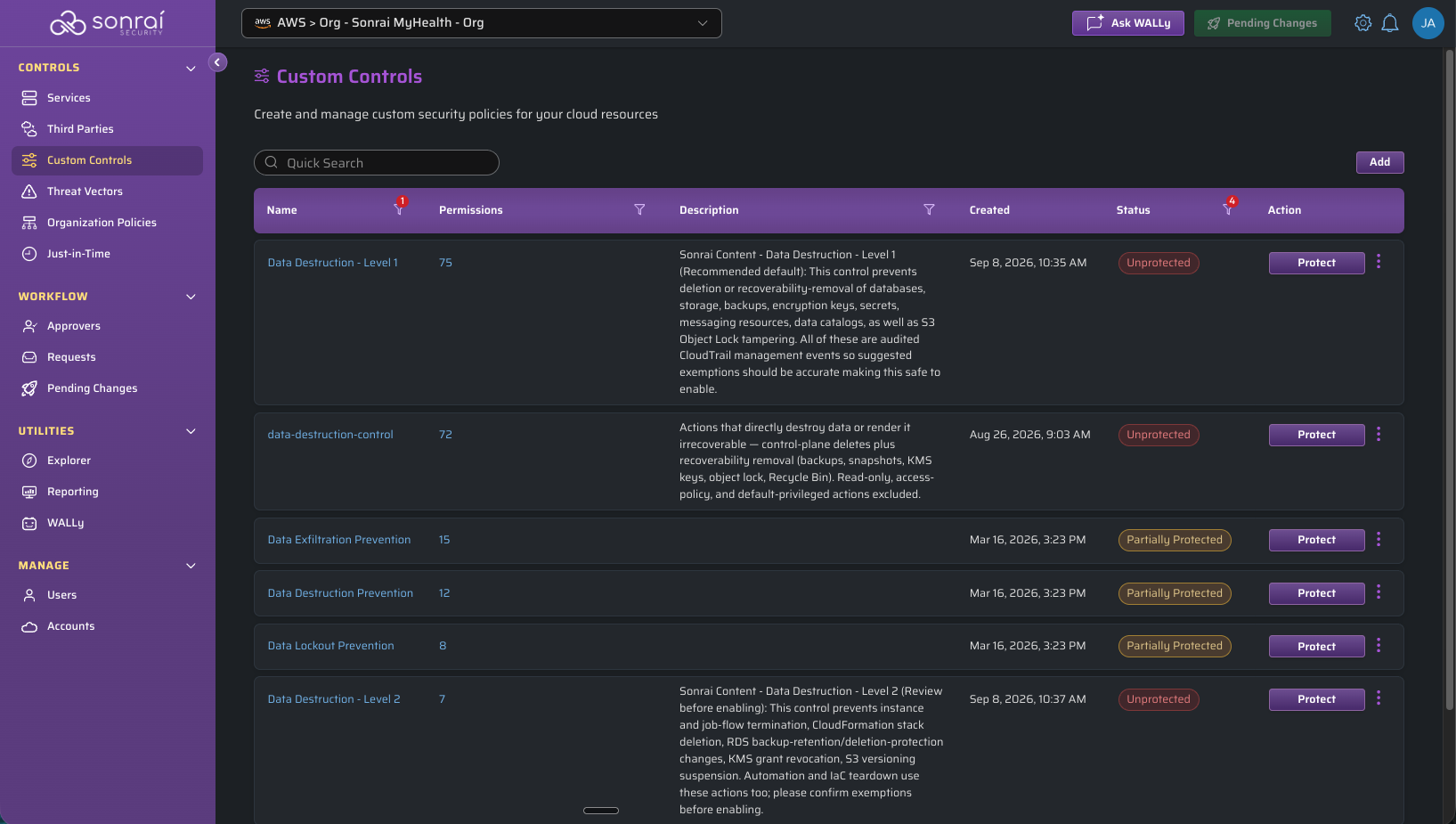
Custom controls let you bundle privilege restrictions for a specific security use case across services.
- In Sonrai, pick the account or organizational unit you want to protect.
- Open Custom Controls and select Data Destruction – Level 1. Level 2 adds the higher-impact and dual-use actions; start with Level 1 unless you have already scoped those.
- Review the destructive permissions the control covers.
- Review the suggested exemptions and approve the identities that should keep access.
- Protect the permissions for every other identity.
Start with the account that would hurt most
You don’t need to roll this out everywhere on day one. Pick the account whose loss would be hardest to recover from, whether that is a production data store, a backup vault, or the account holding your encryption keys, and deploy the control there first. Five minutes closes a door that has probably been open, unexamined, since the account was created.
If you want a hand scoping the control to your environment or deciding what belongs in the optional add-ons, reach out to your Sonrai team.