


7 mins to read
A developer needs access to a storage account. The fastest fix is Contributor at the subscription level. The project wraps up, the access review never happens, and six months later that identity still holds broad write permissions across every resource in the subscription. The account might be dormant. Or it might belong to a service principal that was never offboarded.
This is how most access risk accumulates. Not by misconfigurations, but through excess privilege and standing access that sits unchecked. More permissions means a greater attack surface waiting to be exploited. It is common knowledge the industry best practice for avoiding this is least privilege.
Azure created their own version of RBAC (Role Based Access Control) to help manage this kind of access risk. This blog will review how it works, what its strengths are, and where it falls short on building a least privilege program.
What Is Azure RBAC?
Azure Role-Based Access Control (RBAC) determines who can do what, and where, across Azure resources. It governs the control plane: creating virtual machines, modifying network security groups, reading Key Vault secrets.
The model comes down to a simple formula: principal + role + scope = effective access. A security principal gets a role assignment at a specific scope. That assignment defines what operations they can perform and on which resources.
The Building Blocks: Principal, Role, Scope, and Assignment
You use Azure RBAC by assigning roles. Roles are how you manage permissions and access. There are four elements to know: the security principal, the role definition, the scope, and the role assignment that binds the other three together.
Security Principal: Who Gets Access
Azure RBAC grants access to four identity types: users, Microsoft Entra groups, service principals, and managed identities.
The last two carry the most persistent risk. Service principals and managed identities run workloads and automation continuously. They accumulate permissions across project cycles, rarely appear in access reviews, and are the identities attackers most commonly target after initial compromise. Their activity can blend into normal operational traffic.
Role Definition: What They Can Do
A role definition is a set of permitted and denied actions across four arrays:
- Actions: Control plane operations permitted (e.g., Microsoft.Compute/virtualMachines/write)
- NotActions: Control plane operations excluded
- DataActions: Data plane operations permitted (e.g., Microsoft.Storage/storageAccounts/blobServices/containers/blobs/read)
- NotDataActions: Data plane operations excluded
The most commonly assigned built-in roles:
| Role | What It Grants |
| Owner | Full control, including role assignment |
| Contributor | Full read/write on resources, no role assignment |
| Reader | Read-only across assigned scope |
| User Access Administrator | Role assignment rights only |
| Role Based Access Control Administrator | Role assignment rights, constrained by ABAC conditions |
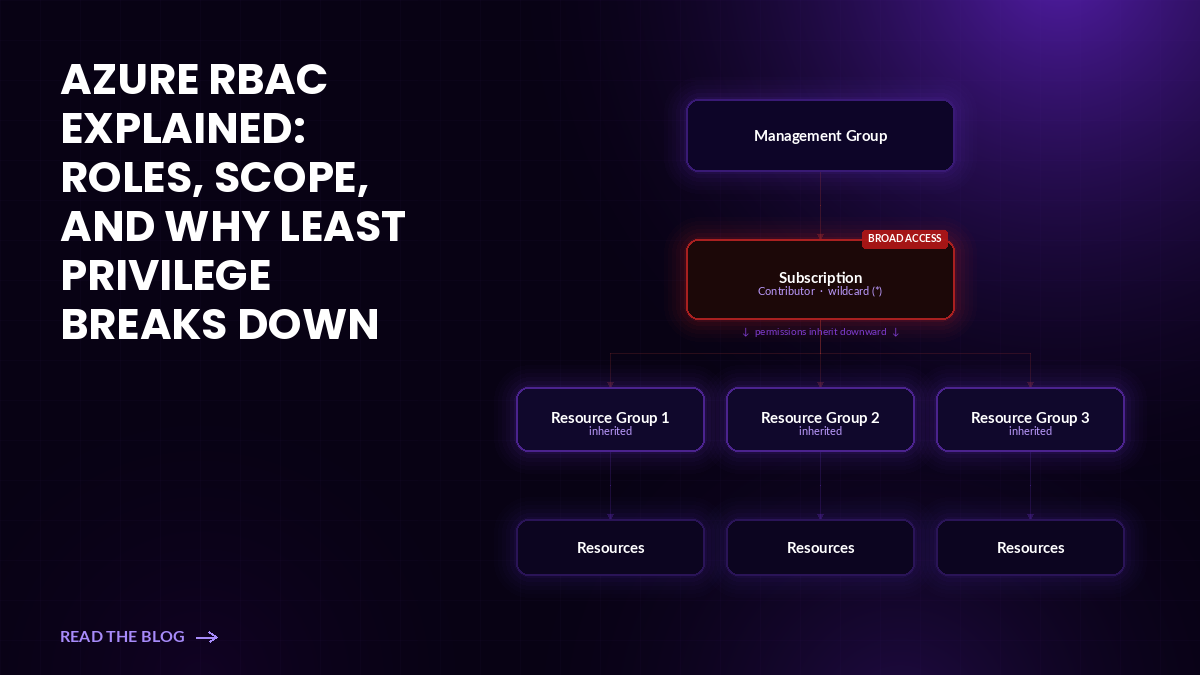
Contributor is worth a closer look. Its Actions array is a wildcard (*) with a short NotActions exclusion list. That means broad write access across nearly every resource type in Azure – infrastructure, networking, storage, compute. The name implies contribution, but the permissions reflect near-admin control.
Scope: Where the Access Applies
RBAC operates at four scope levels, broadest to narrowest: management group, subscription, resource group, and individual resource.
Assignments inherit downward. A role granted at the subscription level flows to every resource group and resource beneath it. Scope multiplies the effective reach of any role. An Owner assignment at the management group level means ownership over every subscription, resource group, and resource in that hierarchy.
Role Assignment: Tying It Together
A role assignment binds one principal, one role, and one scope. An identity’s effective access is the sum of every assignment it holds whether direct, inherited, or acquired through group membership. There is no single view in the Azure portal that shows this aggregated picture without additional tooling.
Why Azure RBAC Does Not Automatically Enforce Least Privilege
Attack surface expands because speed and convenience often wins. Broad roles at high scopes unblock work fast. Access reviews require coordination that most teams don’t have bandwidth for. Temporary project access slips into permanent standing access. This gap between assigned permissions and required permissions only grows over time.
Utilizing role based access is a great step for controlling access, but if you’re looking to reach least privilege and minimize your permissions attack surface, RBAC alone is not enough. Azure RBAC is a means of enabling access controls. It does not flag unused assignments, evaluate whether access is still needed, or remove permissions that have been inactive for months.
Where Least Privilege Breaks Down in Azure RBAC
Broad roles assigned too widely. Owner and Contributor get assigned at the subscription level because they solve the immediate problem. They rarely get scoped down or removed after the need passes.
Inherited access from higher scopes. A group assignment at the management group level grants access to every subscription beneath it. Most access reviews focus on individual resource assignments and miss what flows from above.
Non-human identity sprawl. Service principals and managed identities are created for specific workloads or projects. When those projects end, the identities often stay active with their original permissions intact. They are not tied to employee offboarding workflows. Nobody flags them.
Why Unused Azure Permissions Create Identity Risk
If an identity is compromised, every permission it holds (actively used or not) is available to an attacker immediately. A developer account with subscription-level Contributor that hasn’t touched a particular resource group in eight months still holds write access to it. A service principal provisioned for a decommissioned data pipeline still holds whatever role it was originally granted. This privilege is what attackers look for to move laterally through your cloud, do recon, escalate further, and ultimately make impact. The less standing privilege available to them, the less opportunity for damage.
Azure RBAC Best Practices for Least Privilege
Assign the narrowest role at the narrowest scope. Owner and Contributor at subscription scope should be exceptions with documented justification, not defaults. Most workloads need access to specific resource types within specific resource groups.
Cap subscription Owners. Microsoft recommends no more than three Owner assignments per subscription. Convert excess Owners to Contributor or scoped-down custom roles. Assign through Entra groups and review both group membership and inherited access together. Note: a user added to an Owners group three projects ago may still carry that access.
Constrain delegation rights. User Access Administrator can grant any role to any principal at any scope. That makes it effectively equivalent to Owner for lateral movement purposes. Prefer the Role Based Access Control Administrator role, constrained with ABAC conditions that limit what roles can be assigned and where.
Treat service principals and managed identities as first-class identities. Audit for dormant ones (those that haven’t been active for a significant time) and retire them. For active non-human identities, prefer narrow built-in roles. Key Vault Secrets User instead of Key Vault Contributor, for example.
Replace standing privilege with just-in-time access. Microsoft Entra Privileged Identity Management (PIM) converts standing role assignments into eligible assignments that require explicit activation. An identity doesn’t hold active privilege until it needs to perform a specific task. Right-size roles based on actual Activity Log usage, not role names. An identity using five permissions out of the 200 its assigned role grants is a candidate for a narrower custom role.
Beyond Azure-Native Controls: Least Privilege at Scale
PIM, ABAC conditions, and access reviews are useful. But they have a shared limitation: they reflect what was configured, not what’s actually being used.
An access review confirms that an assignment exists and someone acknowledged it. It doesn’t tell you whether the permissions behind that assignment have ever been used. A team can complete a quarterly review, check every box, and still be sitting on thousands of unused privileged permissions across their service principals and managed identities. The review happened, but the risk didn’t go anywhere.
Usage-based least privilege approaches it differently. Instead of thinking about whether an assignment makes sense in theory, it considers whether it’s actually used and needed. Restriction is based on observed behavior, not role names or someone’s best judgment during a review cycle.
That’s the foundation Sonrai’s Cloud Permissions Firewall is built on. It maps actual permission usage across human, machine, and AI, identifies what’s going unused, and restricts that access using Azure native controls. When access is legitimately needed, it’s requested and approved through a Just-in-Time model with a full audit trail. When it’s done, it’s gone. No standing privilege, no jump boxes, no new infrastructure.
The thing that makes this different from role right-sizing or PIM alone is scope. It covers every identity type – user accounts, service principals, managed identities, federated workload identities – and surfaces recommendations with enough context that security teams can act without manually auditing thousands of role assignments or second-guessing whether a change will break something in production.
Conclusion
Azure RBAC defines access. It does not maintain it.
The gap between what identities are permitted to do and what they actually need grows every time a broad role is assigned for convenience and never revisited. Contributor and Owner at subscription scope. Inherited access from management groups no one is reviewing. Service principals carrying standing privilege from projects that no longer exist.
Least privilege built at the time of configuration time degrades. Least privilege enforced continuously – based on real usage, across every identity at scale – holds.

Frequently Asked Questions
What is the difference between a role and a scope in Azure RBAC?
A role defines what operations an identity can perform. A scope defines where those operations apply. The same role at a broader scope grants more access than the same role at a narrower one — because assignments inherit downward through the resource hierarchy.
Does Azure RBAC automatically remove unused permissions?
No. Azure RBAC enforces the assignments that exist. It does not detect when permissions are no longer used, flag idle assignments, or reduce access based on observed behavior. Removing unused permissions requires manual access reviews, PIM expiration policies, or tooling that measures actual permission usage.
Why are service principals and managed identities risky in Azure RBAC?
They carry standing privilege and get reviewed far less often than user accounts. They are not tied to employee offboarding workflows, frequently outlive the projects they were created for, and their access patterns blend into normal automation activity. A compromised service principal with broad standing permissions gives an attacker immediate, authenticated access to cloud resources — with no MFA prompt, no conditional access check, and no user to alert.
Is Azure RBAC the same as Microsoft Entra PIM?
No. Azure RBAC defines and enforces role assignments. Microsoft Entra PIM is a governance layer on top of RBAC that converts standing assignments to eligible ones, requiring explicit activation before access goes live. PIM limits the window during which a role is active. It does not determine whether the assigned permissions are actually needed.
What are the most common Azure RBAC mistakes that break least privilege?
Assigning Owner or Contributor at subscription scope when a narrower custom role would work. Granting access through high-scope group assignments that get reviewed infrequently. Failing to retire service principals and managed identities after their workloads are decommissioned. Using role names as a proxy for actual permission scope without checking the underlying Actions arrays.
Does Microsoft Entra PIM enforce least privilege on its own?
PIM limits the duration of active standing privilege. It does not limit the breadth of it. An identity eligible for Contributor through PIM, once activated, holds the same broad wildcard permissions as a standing Contributor assignment. Right-sizing the role — based on what permissions are actually exercised — is a separate step. PIM does not do it.
Tally Shea